Auditing Keywords
Service-specific auditing configuration keywords are listed in the configuration file that defines the particular service. For example, all DDS configuration file keywords, including auditing keywords, are defined in the DDS Configuration File Keywords topic.
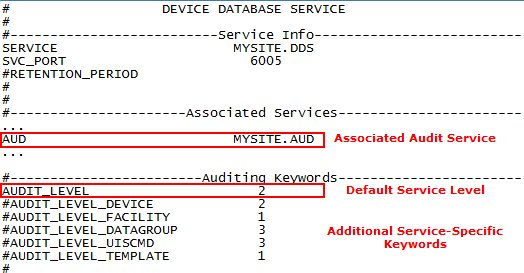
The AUD keyword (in the "Associated Services" section) in each audited service’s configuration file must be enabled for any auditing to take place. The keyword must define a valid audit service to report changes to in Site.AUD format. If no valid audit service is specified auditing will not occur regardless of other auditing keyword settings.
Service audit levels define the degree of detail in an audit record and are defined for each auditing keyword. The AUDIT_LEVEL keyword parameter defines the minimum audit level for the service. However, many services have additional auditing keywords that define service specific categories of audit records.
Example
The DDS keyword AUDIT_LEVEL_DATAGROUP sets the level of detail of the audit records for changes to Data Groups. This allows some audit records be more detailed than others.
If only the AUDIT_LEVEL keyword is defined for a service, all other auditing keywords assume that level, even if they are commented out. However, enabling and providing levels for the other auditing keywords overrides the default audit level.
Example
In the configuration file shown below, auditing is enabled and changes will be reported to the associated audit service, MYSITE.AUD. All records will be audited at level 2 (AUDIT_LEVEL). If the additional keywords are uncommented, the applicable records would be audited at level 1, 2, or 3 accordingly. For example, DDS Data Group records would be audited at level 3, UIS Command records would be audited at level 3, and DDS Template records would be audited at level 1.
|
DDS Audit Keywords and Levels |